Should You Upgrade from Rode Wireless Micro to Rode Wireless Go Gen 3?
For content creators, journalists, podcasters, and anyone who relies on wireless lavalier systems, the choice of a transmitter/receiver pack affects audio quality, workflow, and reliability. Rode's Wireless Micro and Rode Wireless Go line have both been popular choices for filmmakers and communicators who need compact, easy-to-use wireless audio. This article examines whether upgrading from the Wireless Micro to the Wireless Go Gen 3 makes sense, comparing design, features, real-world performance, and buying considerations so readers can decide based on use case rather than marketing.
Quick primer: what each product is and who it's for
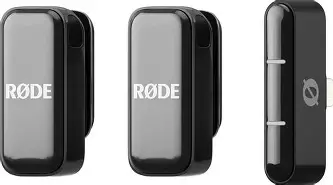
Rode Wireless Micro is a compact transmitter-and-receiver solution built for extreme portability and simplicity. It appeals to run-and-gun videographers, mobile journalists, and social creators who prioritize minimal setup, low visual footprint on camera, and fast rigging with very small transmitters that double as clip-on mics.
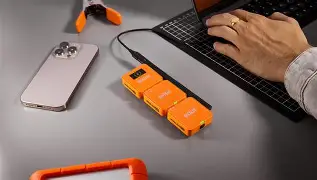
Rode Wireless Go Gen 3 sits one step up in Rode’s product stack: it aims to balance portability with expanded features — multi-channel support, more advanced app integration, and workflow-focused enhancements. Where the Wireless Micro is optimized for ultimate compactness, the Wireless Go Gen 3 is designed for creators who want more control, extra flexibility for multi-person capture, and improved signal/latency behavior in diverse shooting environments.
Design and build: size, mounting, and ergonomics
Both products aim for portability, but they take different trade-offs.
- Wireless Micro: Extremely small transmitter housing, often used directly as a clip-on microphone. The minimal size reduces visual impact on talent and is easy to conceal. The receiver is similarly compact and mounts directly to cameras or mobile devices with minimal footprint. The package favors simplicity over modularity.
- Wireless Go Gen 3: Larger than the Wireless Micro but still compact. The transmitter units typically offer more physical controls and status indicators, and the receiver can handle more simultaneous channels or more advanced routing. The Gen 3 series usually improves ergonomics for repeated production use (clearer buttons, more robust clips, better battery compartments) and offers a better balance between form and function.
In practice, if the smallest possible transmitter is a must (e.g., for on-stage talent close-ups or discreet run-and-gun interviews), the Wireless Micro's form factor wins. For multi-talent shoots or situations where the receiver needs clearer status feedback and physical controls, the Wireless Go Gen 3 is more comfortable to work with on set.
Audio performance and real-world reliability
Audio quality is the top priority for most buyers. Tonal balance, noise floor, clipping behavior, and the system’s ability to hold a stable connection in crowded RF environments all matter.
- Tonal characteristics: Both systems use high-quality preamps and are tuned for clear speech reproduction. The Micro’s tiny capsule and housing may slightly color the voice compared with full lavalier capsules used with the Go series’ transmitters, but in typical speech recording scenarios the difference is subtle and often imperceptible without direct A/B testing.
- Signal stability: The Gen 3 line is designed with more robust digital link management and stronger multi-path handling, which translates to fewer dropouts in urban environments, crowded venues, or when talent moves behind obstacles. For crucial interviews and event coverage, the perceived reliability gain is meaningful.
- Latency: Low latency is essential for live monitoring and sync. The Gen 3 typically improves on earlier generations in latency characteristics and monitoring flexibility, which benefits multi-camera shoots and live streaming where lip-sync matters.
- Noise and handling: The Wireless Go Gen 3 generally offers improved wind/handling suppression when used with proper lavs and windscreens. The Micro can still produce excellent results with careful mic placement and accessories, but it's more sensitive to placement because of its tiny form factor.
Overall, the Gen 3 tends to be more forgiving in difficult RF and acoustic conditions; the Wireless Micro is excellent where simplicity and concealment trump advanced connectivity.
Features and workflow differences
Upgrading is rarely just about audio — it’s about whether extra features will save time, reduce stress, or enable new production types.
- Channel flexibility: Gen 3 often supports more flexible multi-channel operation (e.g., recording two or more sources simultaneously, on-device or receiver-side routing). This is helpful for two-person interviews or on-camera plus ambient pickup workflows.
- On-device recording and redundancy: Higher-tier models in the Wireless Go family usually emphasize safety features such as internal recording on transmitters or receivers to act as a backup. This protects against RF dropouts and is a major deterrent against losing a take.
- App control and metadata: Gen 3 systems tend to integrate with a mobile or desktop app that exposes gain control, naming, metadata, and firmware updates. This can greatly speed multi-mic setups and helps in post-production organization.
- Inputs and monitoring: The Gen 3 receiver often includes more flexible outputs, line-level options, and headphone monitoring. Creators who monitor in-camera or through field recorders benefit from more routing choices.
- Battery and charging: Later-gen models invest in better battery life and charging ergonomics (USB-C, case charging). The convenience of fast charging and predictable runtime matters for a full day of shoots.
Real-world use cases — who benefits most from each system?
Examining common production scenarios clarifies which kit is the better fit.
Discover deals on Audio & Headphones — updated daily.
See Deals →Run-and-gun solo vlogging
For solo creators shooting with a camera or phone, minimal setup and low visibility are crucial. The Wireless Micro’s compactness and one-button simplicity are strong benefits. If the creator rarely records more than one voice and wants the smallest possible footprint, the Micro is sufficient.
Two-person interview or documentary work
When interviews involve two or more sources, or when redundancy and app-based control are prioritized, the Wireless Go Gen 3’s multi-channel capabilities and safety features make it more appropriate. The extra controls and monitoring options reduce the odds of failed takes, which is valuable on client shoots and documentary setups where retakes are costly.
Corporate and event work
Event runs and corporate presentations often require reliable RF in crowded venues and long continuous runtime. The Gen 3’s improved link robustness and battery/charging conveniences are practical advantages. The Micro can still work, but the Gen 3 reduces workarounds and technical risk.
Film and narrative production
On narrative sets where lavalier placement and low profile are essential, the Wireless Micro’s size helps. However, sound teams often prefer the flexibility and redundancy of higher-tier systems for multi-track recording and integration with professional mixers — areas where Gen 3 shines.
Pros & cons — Rode Wireless Micro
- Pros:
- Extremely compact and low-visibility transmitters
- Very fast to rig — ideal for one-person crews
- Simple controls reduce user error for beginners
- Lightweight and unobtrusive on camera or talent
- Cons:
- Limited multi-channel flexibility
- Fewer monitoring and routing options; less app control
- Potentially more sensitive to placement and handling noise
- May lack advanced redundancy features useful on professional shoots
Pros & cons — Rode Wireless Go Gen 3
- Pros:
- Better multi-channel and routing options for interviews
- Improved signal stability and on-device control for professional workflows
- App integration and metadata support streamline setup and naming
- More robust monitoring and output options for varied recorders
- Cons:
- Larger transmitters are more visible on talent
- Added features add complexity for casual users
- Higher upfront cost relative to the Micro
Side-by-side comparison
| Feature | Rode Wireless Micro | Rode Wireless Go Gen 3 |
|---|---|---|
| Form factor | Ultra-compact transmitters; minimal receiver | Compact but larger than Micro; more controls |
| Multi-channel support | Primarily single-channel (simple setups) | Designed for flexible multi-channel operation |
| On-device recording / redundancy | Limited or no built-in redundancy features | Emphasizes safety features and backup recording options |
| Monitoring & outputs | Basic outputs; limited monitoring options | Expanded monitoring and output flexibility |
| App / metadata | Minimal app control | More extensive app integration for naming and settings |
| Best for | Solo creators, discreet placements, travel | Interviews, professional shoots, multi-talent setups |
Buying guide: should you upgrade?
Deciding whether to upgrade involves matching features to needs and weighing the cost versus practical benefits. The following considerations will help determine if the Wireless Go Gen 3 is a worthwhile investment.
1. How often do you record multiple sources?
If most projects are single‑person recordings, the Micro often meets needs and keeps workflows simple. If two or more people are regularly recorded or redundancy is essential, the Gen 3’s multi-channel capabilities and backup options justify the upgrade.
2. Is RF reliability a frequent concern?
Upgrading is sensible for anyone who shoots in RF-challenging environments: festivals, conventions, stadiums, or urban centers with many Wi-Fi and Bluetooth signals. The Gen 3’s advanced link management can reduce dropouts and save re-shoots.
3. Do you need better monitoring and routing?
Sound professionals and creators who route audio to multiple devices (camera + recorder + live stream) will find the Gen 3’s outputs and monitoring controls useful. Casual users who self-record and don’t monitor live may not need these features.
Discover deals on Audio & Headphones — updated daily.
View Offers →4. Is budget a limiting factor?
Upgrading comes with an associated cost. For creators on a tight budget, a new lavalier, improved windscreens, or a better placement strategy with the Wireless Micro can often produce large audio gains for less money than a full system upgrade.
5. How important is simplicity?
If the priority is "grab-and-go" simplicity, the Micro excels. If the priority is "robust, repeatable production," the Gen 3 offers tools that reduce on-set uncertainty and streamline post-production.
Practical upgrade tips
- Test the return on investment: Before committing, rent or borrow a Gen 3 unit for a few shoots that represent typical working conditions. Compare the time saved, the number of successful takes, and the stress reduction to the upgrade cost.
- Consider hybrid approaches: Many teams use a Wireless Micro as a backup or as a secondary mic for concealed placements while the Gen 3 handles primary recording and redundancy.
- Accessories matter: Proper lavalier capsules, wind protection, and cable management often yield as much audible improvement as a new transmitter. Invest in windscreens and lav clips alongside any upgrade.
- Workflow integration: Check compatibility with current cameras, mixers, and phone-based live streaming gear. The Gen 3’s routing and app features can simplify integration but require a small adjustment period.
Common buyer concerns addressed
“Will the Gen 3 sound better than my Micro?” In many situations the audible difference is modest for straightforward speech, but the Gen 3’s improved preamps and link reliability can produce noticeably cleaner takes under challenging conditions.
“Is it worth it for occasional interviews?” If interviews are occasional and budget is limited, the Micro may remain adequate. If interviews are frequent, client-facing, or must be captured flawlessly, the Gen 3 reduces risk and often pays back its cost over time through saved retakes and faster post-production.
“Can I use both systems together?” Yes. Many productions mix systems: Micro units for discreteness and Gen 3 for primary capture or monitoring. However, confirm frequency and channel planning to avoid interference and to ensure proper routing.
Conclusion
The decision to upgrade from the Rode Wireless Micro to the Rode Wireless Go Gen 3 depends on the balance between portability and production requirements. The Wireless Micro remains a compelling choice for creators who prize concealment, speed, and simplicity. The Wireless Go Gen 3, by contrast, brings multi-channel flexibility, stronger reliability in difficult RF environments, and workflow-enhancing features that benefit interviews, event coverage, and professional shoots.
In short: keep the Wireless Micro if minimal footprint and simplicity are the priority; consider the Wireless Go Gen 3 if multi-person recording, redundancy, or professional reliability are regular needs. For many creators, the ideal setup is not a wholesale replacement but a considered addition — adding Gen 3 capability where it matters while keeping Micro units where tiny size and speed are essential.