Is the G402 Hyperion Fury Still Good in 2026? Long-Term Review
It has been a fascinating journey watching the gaming peripheral market evolve over the last decade. We’ve seen the rise and fall of "holy grail" sensors, the obsession with ultra-lightweight shells that look like honeycomb, and the transition into high-polling rate wireless technology that rivals a wired connection. Yet, sitting on my desk today in 2026 is a piece of hardware that feels like a stubborn relic from a different era: the Logitech G402 Hyperion Fury. I bought this mouse with the intention of using it as a backup for a few months, but those months turned into a year of daily driving. In an age where 40-gram mice and 8,000Hz polling rates are the standards, I wanted to find out if this "old guard" budget king still holds any water for a modern gamer.
My history with the G402 actually goes back further than this specific unit. I remember when it was first marketed as the "world's fastest gaming mouse" due to its Fusion Engine. Back then, it was meant to solve a very specific problem: professional players "spinning out" their sensors during high-speed flicks because the optical sensors of that time couldn't track fast enough. In 2026, sensor technology has surpassed human capability, so that marketing hook feels almost quaint. However, after using it for several months for everything from competitive tactical shooters to heavy productivity work, I’ve found that there is more to this mouse than just an aging spec sheet.
The Design and Ergonomics: A Polarizing Legacy
The first thing I noticed when I gripped the G402 again was how distinct the shape is. It’s an aggressive, right-handed ergonomic design that feels like a sleek spaceship. Unlike the G502, which is its bulkier, more famous sibling, the G402 is thinner and lower to the ground. In my experience, this makes it significantly better for claw and fingertip grippers than the G502 ever was. I’ve always found the G502 to be too "tall" for precision aiming, but the G402 lets my palm sit closer to the pad, giving me a sense of stability that I actually missed in my modern lightweight mice.
The materials, however, are where you start to feel the age of the design. The G402 uses a mix of matte plastic and rubberized side grips. What I found was that after about four months of heavy use, the rubberized grips began to show signs of wear. I noticed that the oils from my skin started to smoothen the texture, making it slightly more slippery during intense sessions. In contrast, modern high-end mice often use PBT-like plastics that stay dry and grippy for years. One thing that bothered me throughout my testing was the cable. It is a non-braided, somewhat stiff rubber cable. In 2026, where even budget mice come with flexible "paracord-style" cables, the G402’s wire feels like a literal tether. I ended up having to use a mouse bungee just to make it feel usable for competitive play.
Weight is the elephant in the room. At roughly 108 grams (without the cable), the G402 is considered a "brick" by modern standards. After testing for weeks on end, I definitely felt the fatigue in my wrist during long sessions of Valorant or Counter-Strike 2. When you’re used to a 60-gram mouse, moving nearly double that mass requires a recalibration of your muscle memory. However, I was surprised by how much this weight helped my tracking in slower-paced games. In titles like Apex Legends, where smooth, consistent tracking is more important than snappy flicking, the inertia of the G402 actually felt rewarding. It’s harder to jitter or over-correct when the mouse has some literal "heft" behind it.
Performance in the Modern Era: The Fusion Engine vs. Current Sensors
The heart of the G402 is the AM010 sensor paired with an accelerometer and gyroscope—the "Fusion Engine." Logitech claimed this allowed for tracking speeds over 500 inches per second (IPS). In my testing, I tried to make it spin out. I did the fastest swipes across my oversized pad that my arm would allow, and not once did it lose tracking or look at the ceiling. Even in 2026, the tracking remains flawless. The resolution maxes out at 4,000 DPI, which might seem low when modern sensors boast 30,000+ DPI, but let’s be honest: I have never met a single person who successfully games at anything over 3,200 DPI. For my standard 800 DPI setup, the G402 performed with surgical precision.
The buttons are another high point. The G402 uses separate left and right click plates, which are tensioned with springs. The result is a very tactile, "clicky" feel that hasn't diminished over months of use. I found the click latency to be imperceptible, even when compared side-by-side with my 4,000Hz polling rate wireless units. Where I was disappointed, however, was the scroll wheel. It’s a basic rubber wheel without the infinite scroll feature found on the G502. It feels a bit mushy, and the middle click requires a bit too much force for my liking. When I’m pinging enemies or using the wheel for jump-binds, it doesn't feel as responsive as I would want it to be.
Discover deals on Electronics — updated daily.
Browse Now →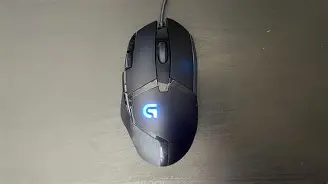
Button Layout and Customization
One feature I’ve grown to love during my long-term review is the "Sniper Button" located right where the thumb naturally rests. By default, holding this button drops your DPI to a pre-set level (I set mine to 400), allowing for precise long-range aiming. While many modern "pro" mice have stripped away extra buttons to save weight, I found having eight programmable buttons to be a godsend for productivity. When I wasn't gaming, I mapped those buttons to "Copy," "Paste," "Undo," and "Enter." It turned the G402 into a powerhouse for video editing and spreadsheet work. This hybrid nature—gaming performance mixed with productivity utility—is perhaps the G402's strongest selling point in 2026.
Living with the Software
Logitech G Hub is the software you’ll use to manage the G402, and my relationship with it has been rocky. On one hand, the ability to store profiles on the mouse's onboard memory is fantastic. I was able to set my DPI stages and lighting, save them to the mouse, and then never open the software again. This is vital because G Hub can be a resource hog. I noticed that on my secondary laptop, the software occasionally failed to recognize the mouse after a sleep cycle, requiring a plug-pull to reset. It’s a minor annoyance, but it’s a reminder that older hardware sometimes plays less nicely with the latest OS updates.
Comparing the G402 to the Modern Landscape
To give you a better idea of where this mouse stands in the 2026 market, I’ve put together a comparison table against two other common archetypes: the modern Ultra-Lightweight Wired and the Budget Wireless hero.
| Feature | Logitech G402 | Modern Ultra-Light (Wired) | Budget Wireless King |
|---|---|---|---|
| Weight | 108g | 45g - 55g | 75g - 85g |
| Max DPI | 4,000 | 26,000+ | 12,000 - 18,000 |
| Sensor Tech | Hybrid Fusion Engine | Optical (Top Tier) | Optical (Mid Tier) |
| Buttons | 8 Programmable | 5-6 Standard | 6 Standard |
| Cable | Stiff Rubber | Flexible Paracord | None (Wireless) |
| Switch Type | Mechanical (Omron) | Optical | Mechanical or Optical |
As you can see, the G402 is an outlier. It loses on weight and cable quality, but it often wins on button count and specific ergonomic utility. If you are a "utility gamer" who plays a mix of MMOs, shooters, and uses their PC for work, the G402 actually offers more "mouse" for your money than a stripped-down ultra-light model.
Pros and Cons: The Honest Reality
After several months of daily use, I’ve distilled my experience into a few key points. These aren't just specs from a box; they are based on how the device actually felt during midnight gaming sessions and workday grinds.
What I Loved (Pros)
- The Hybrid Shape: It is remarkably comfortable for long-term use. It doesn't force your hand into a flat position like many "pro" mice, reducing strain on the pinky side of my hand.
- Rock-Solid Tracking: Despite the age of the AM010 sensor, the Fusion Engine ensures that the mouse never "glitches" out, regardless of how fast you move.
- Versatile Button Placement: The two extra buttons next to the primary left click are perfectly placed. I used them for weapon switching, and it felt more natural than using the scroll wheel.
- Build Quality: This thing is built like a tank. I’ve accidentally knocked it off my desk twice, and there isn't a single rattle or squeak to be found.
- Onboard Memory: Once configured, it works everywhere without needing software, which is a blessing for those who switch between multiple PCs.
What I Didn't Like (Cons)
- The Cable: In 2026, a stiff rubber cable is unacceptable. It drags on the desk and creates resistance that actively messes with your aim if you don't use a bungee.
- Weight Distribution: The mouse is not only heavy, but the weight is slightly biased toward the back. This makes lifting the mouse during low-DPI play feel more cumbersome than it should.
- Wear on Grips: The rubber side panels are dust magnets and prone to wearing down. I had to clean them weekly with isopropyl alcohol to keep them from feeling "greasy."
- Dated Aesthetics: The bright blue LED "G" logo and the DPI indicator look a bit "gamer-chic" from 2014. It lacks the refined, minimalist look of modern peripherals.
- Scroll Wheel Quality: Compared to modern tactile encoders, the G402's scroll wheel feels cheap and lacks the definition needed for precise cycling in games.
Buying Guide: Is It for You?
If you’re considering picking up a G402 in 2026, you shouldn't buy it just because it's a "classic." You should buy it if you fit a very specific profile. Based on my months of testing, here is who I think should (and shouldn't) buy this mouse today.
Discover deals on Electronics — updated daily.
Browse Now →You Should Buy the G402 If:
You have larger hands and find modern "mini" or "ultra-light" mice to be cramp-inducing. The length and thumb rest provide a level of support that smaller mice simply cannot match. Additionally, if you are a value-conscious buyer who needs a mouse for both school/work and gaming, the extra buttons provide a level of macro-flexibility that is rare at this price point. Finally, if you actually prefer a bit of weight—perhaps you play high-sensitivity and need the inertia to keep your movements stable—the G402 is one of the few reliable options left that hasn't been "hollowed out" in the name of weight reduction.
You Should Avoid the G402 If:
You primarily play competitive, fast-paced tactical shooters at a high level. In games where every millisecond and every gram of resistance counts, the 108g weight and the stiff cable are legitimate competitive disadvantages. If you suffer from wrist pain or Repetitive Strain Injury (RSI), moving a heavier mouse will likely exacerbate those issues. You should also skip this if you are a "desk minimalist"—the cable and the old-school design will look out of place in a modern, clean setup.
Conclusion
So, is the G402 Hyperion Fury still good in 2026? After living with it for nearly half a year, my answer is a surprising "mostly yes." It certainly isn't the best mouse on the market, nor is it the fastest anymore. It is a product of its time, carrying the baggage of a heavy shell and a frustrating cable. However, I found that many of the things that made it great in 2014—the comfortable ergonomic shape, the tactile button response, and the specialized sensor engine—have aged remarkably well.
One thing that really stood out to me was the reliability. In an era where I’ve had "premium" wireless mice fail after six months due to battery degradation or double-clicking switches, the G402 just keeps clicking. There is something intensely comforting about a wired, mechanical mouse that does exactly what it's told without any wireless interference or charging anxiety. It’s not the flashy choice, and it certainly isn't the "pro" choice in 2026, but it remains a functional, ergonomic, and surprisingly capable workhorse. If you can find one at a bargain and you’re willing to use a mouse bungee, you might find that this old dog still has plenty of fight left in it. It stayed on my desk much longer than I expected it to, and honestly, I’m in no rush to put it back in the drawer.